
2.36.24
Expressions
An expression works out a value while a run goes on: {Name} reads a variable, and concat("Hello, ", {Name}, "!") joins three texts into one. This chapter explains how to write expressions, and how the designer helps you build them.
Where expressions are used
- An input filled in as an Expression, of an activity, a sub-process or a start process run, including the start process run's Start at. See Inputs.
- A gateway's conditions, which choose the branches a run takes.
- A mapping's rows, which build a value property by property. See Inputs.
- A trigger's filter, which chooses whether a trigger starts a process, reading what the trigger received as
{Item}.
A run gets its name the same way: the Name input of the Set Process Run Name activity is an expression, such as concat("Shipment ", {ShipmentNumber}, " (", {Shipment.Reference}, ")").
The building blocks
An expression is one of these, and a function's arguments are again any of them:
| Block | Written as | Example |
|---|---|---|
| A variable | Its name in braces. | {Name} |
| A property of a variable | The path, with periods. | {Shipment.Reference}, {Delivery.Address.City} |
| A text | In double quotes. | "Hello, " |
| A whole number | As it is. | 42 |
| A decimal | With a period, never a comma, and no thousands separator. | 2450.5 |
| Yes or no | true or false. | true |
| A date, a date and time, a time | In single quotes. | '2026-10-22', '2026-10-22 14:30:00', '14:30' |
| A function | Its name, and its arguments in brackets, separated by commas. | concat("Hello, ", {Name}, "!") |
There are no operators, such as +, = or >. Everything is a function: add({Amount}, 10) adds, eq({Status}, "Paid") compares, gt({Amount}, 10000) tests greater than, and and(…) combines conditions. Functions nest: if(gt({Amount}, 10000), "Large", "Small").
Some details:
- Names are not case-sensitive:
{name}is{Name}, andConcatisconcat. Comparing texts isn't either:eq("paid", "Paid")is true. - A text can't contain a double quote. There is no way to escape one. Everything else may be in a text, braces and commas included:
"{not a variable}". - Spaces between the blocks don't matter:
concat( "a" , {B} )isconcat("a",{B}). - There is no text with variables in it, such as
Hello {Name}: that is an error. Useconcat("Hello ", {Name}), or a template. - Plain text, alone, is a value too: an expression that is just Stock reserved. is that text, and 42 that number. It can't contain any of
( ) { } , " ' $, though: for such a text, use a literal. - Functions nest up to 32 deep.
Empty values
A variable that was never given a value is empty, and so is a property the value doesn't have. An empty value is not the same as an empty text: eq({Name}, "") is false when Name is empty. Use these instead:
isEmpty({Name}): true when Name holds nothing, an empty text, only spaces, or an empty list.ifEmpty({Name}, "unknown"): Name, or unknown when it holds nothing.ifNull({Name}, "unknown"): Name, or unknown when it was never set.
Most functions give an empty value rather than an error when they can't do their work, such as divide({Total}, 0) or parseDecimal("n/a").
Functions
There are 67 functions, in six groups. These are the ones you'll use most:
| Group | Functions | Example |
|---|---|---|
| Comparison | eq, ne, gt, lt | gt({Amount}, 10000) |
| Logic | and, or, not, if, isEmpty, ifEmpty, ifNull, isTrue, isFalse | if(isEmpty({Comment}), "No comment", {Comment}) |
| Math | add, subtract, multiply, divide, round, roundUp, roundDown, inc, sum, avg, min, max, parseInteger, parseDecimal, parseAmount | round(multiply({Price}, 1.21), 2) |
| Text | concat, format, length, contains, containsAny, startsWith, endsWith, match, extract, replace, replaceRegex, trim, lower, upper, padLeft, split, toJson | upper(trim({Code})) |
| Collections | count, any, first, last, elementAt, filter, select, join, distinct, union, values | count({Deliveries}) |
| Date and time | now, today, dateTime, date, time, parseDateTime, parseDate, parseTime, addDays, addWorkingDays, daysBetween | addWorkingDays(today(), 2) |
The builder lists every function, with what it does and the arguments it takes, and so does the appendix: see Expression functions.
Texts: concat joins anything into a text, numbers and dates included, and skips empty values. format writes a number or a date in a .NET format, such as format({Amount}, "0.00") or format(today(), "dd-MM-yyyy"). match, extract and replaceRegex take a regular expression.
Numbers: add, subtract, multiply, divide, sum and avg give a Decimal. inc counts an Integer up. parseAmount reads an amount as people write it, in Dutch or English, such as 1.234,56 or 1,234.56.
Dates: now() and today() are the current time and date where the server runs, or in the organization's time zone where it has one. addWorkingDays skips Saturdays and Sundays, but knows no public holidays.
Lists
A path can't go into a list: {Email.To.Address} is an error, because To is a list of addresses, and there is no [0]. The collection functions work on lists instead:
| To get | Write |
|---|---|
| How many items | count({Deliveries}) |
| How many items match | count({Deliveries}, "Address.Country", "NL") |
| Whether any item matches | any({Deliveries}, "Weight", "gt", 100) |
| The first, the last, the third | first({Deliveries}), last({Deliveries}), elementAt({Deliveries}, 2) |
| One property of the first | first({Email.To}, "Address") |
| The items that match | filter({Deliveries}, "Address.Country", "NL") |
| One property of every item | select({Deliveries}, "Recipient") |
| A list as one text | join(select({Email.To}, "Address"), ", ") |
| A total | sum({Deliveries}, "Weight") |
A path inside these functions is a text in quotes, from the item: "Address.Country". "" is the item itself. The comparisons a function such as any, count or filter can make are eq, ne, gt, lt, contains, startsWith, endsWith and match. elementAt counts from 0.
Types in expressions
Every block has a type: "Hello" is a String, 42 an Integer, {Amount} the type of Amount, and a function the type it gives back. The designer works out the type of the whole expression, and it must be the type the input takes, or the field says Expression does not return 'String'. Convert where needed: see Which value fits where.
Inside a function, an argument may be converted for you where nothing is lost: eq({ShipmentNumber}, "17") compares an Integer with a text that holds one, and gt({Amount}, 10000) a Decimal with an Integer.
The expression builder
Click ƒx beside an input to edit its expression in a dialog. Builder shows the expression as a tree of rows, one row per block; Text shows it as text.
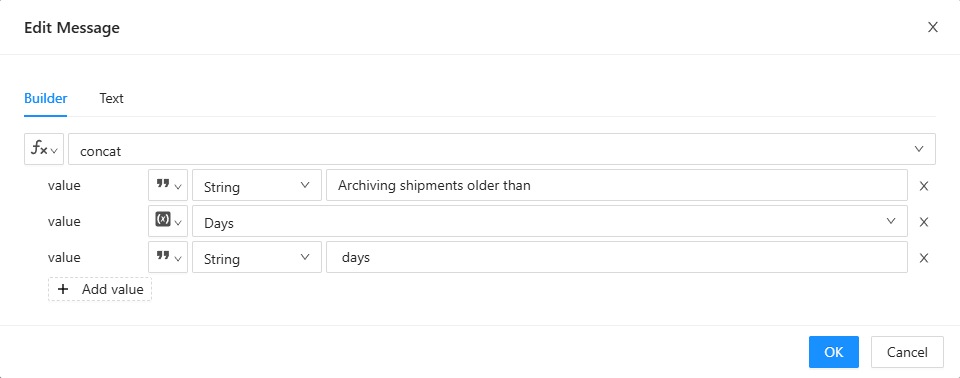
- Each row is a Function, a Variable or a Value: the button at its start chooses. An empty row says Choose a function, variable or value.
- A function is picked from a list (Choose a function), grouped as in the table above, with its type and what it does. Search it by typing. The function's arguments appear as rows under it, each with its name, and optional when it may be left out. A function that takes any number of arguments, such as
concat, has an Add button for the next one. A function that can be called in more than one way, such ascount, asks which (Choose a form). - A variable is picked from the variables the node can read, with their properties. Variables of a type the place doesn't take are grey.
- A value is typed in, in a field that fits its type: a text box, a number box, true or false, a date picker. Where more than one type would fit, pick its Type first.
- Problems show under the row they are about, as you build.
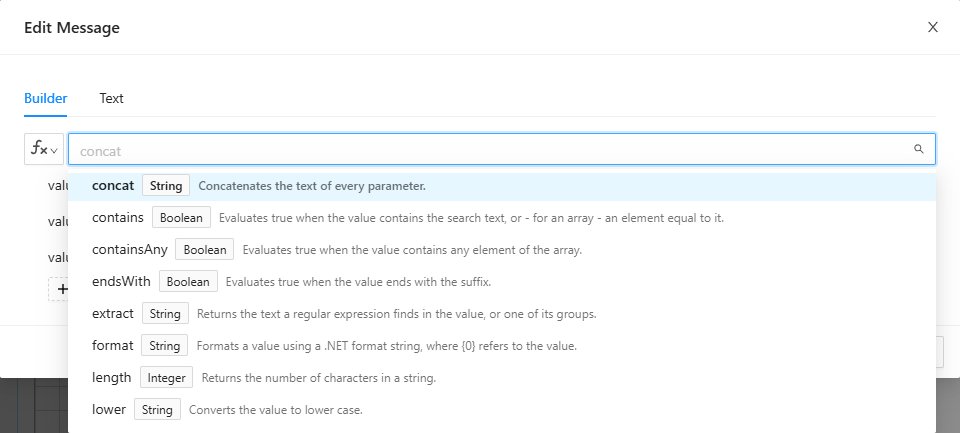
On Text, you type the expression, and its problems show under it. You can switch between the tabs as long as the expression is complete and correct (Complete the expression to switch tabs, Fix the errors to switch tabs). An expression the builder can't show stays on Text (This expression cannot be shown in the builder).
OK puts the expression in the input, and Cancel leaves the input as it was. The builder writes the expression its own way, so spaces may change.
When an expression runs
Spider works out an activity's expressions on the server, just before it hands the activity to an agent, with the values the variables have at that moment. The agent gets the results, never the expressions.
When an expression fails during a run, because a value is missing or of the wrong kind, the node fails before it reaches an agent. Its log says which input, and why: The activity's input value(s) are not valid: followed by Input 'Value': …. A gateway logs each condition it works out, Evaluating expression: …, and its result, so the log shows why a branch was or wasn't taken.
What the check says
The field shows the problems as you type, and the designer's check lists them as The input 'Message' has an invalid expression: …. The most common:
| Message | Cause |
|---|---|
| Unknown variable 'Nmae' | A typo, a variable that was renamed or deleted, or one the node can't see: see Scope. |
| Invalid variable property 'Adress' | The type has no such property. |
| Invalid variable property 'Address': 'To' is a list, which a path cannot cross | A path into a list: see Lists. |
| Unknown function 'concatenate' | No such function. |
| Unexpected token { at character 7 | Usually text and variables mixed without concat, such as Hello {Name}. |
| Unclosed function concat | A bracket is missing. |
| Function 'gt' expects 2 parameters | Too many or too few arguments. |
| Function 'add' expects 2nd parameter to be a(n) … | An argument of the wrong type, such as a text where a number belongs. |
| Parameter 2 (Decimal) is not convertable to Integer | Two values that can't be compared or combined, such as an Integer and 1.5. |
| Expression does not return 'String' | The whole expression gives another type than the input takes: see Types in expressions. |
| Unknown type for literal 'null' | There is no null: use isEmpty or ifNull. A word without quotes is the same mistake: put text in double quotes. |
Related chapters
- Inputs: the other ways to fill an input in.
- Variables and parameters: what
{Name}can read. - Types: which value fits where.