
2.36.24
Milestones and reports
A run's logs tell an expert what happened. Milestones and reports tell everyone else: how far a run got, in words of the business, such as Received and Shipped, and what it did, such as Shipment registered. You declare them on the process, and mark them with an activity where they happen. This chapter explains both.
| Milestone | Report | |
|---|---|---|
| Says | How far the run got. | That something happened. |
| Shows | With an icon and a colour, on the run's page and in the lists of runs. | On the run's page. |
| Marked | When the activity runs; the latest is the run's milestone. | Each time the activity runs. |
Milestones
A process's milestones are on the Milestones tab of the designer, in the order a run usually reaches them. Add milestone on the ribbon adds one, and Move up and Move down, or dragging, change the order.
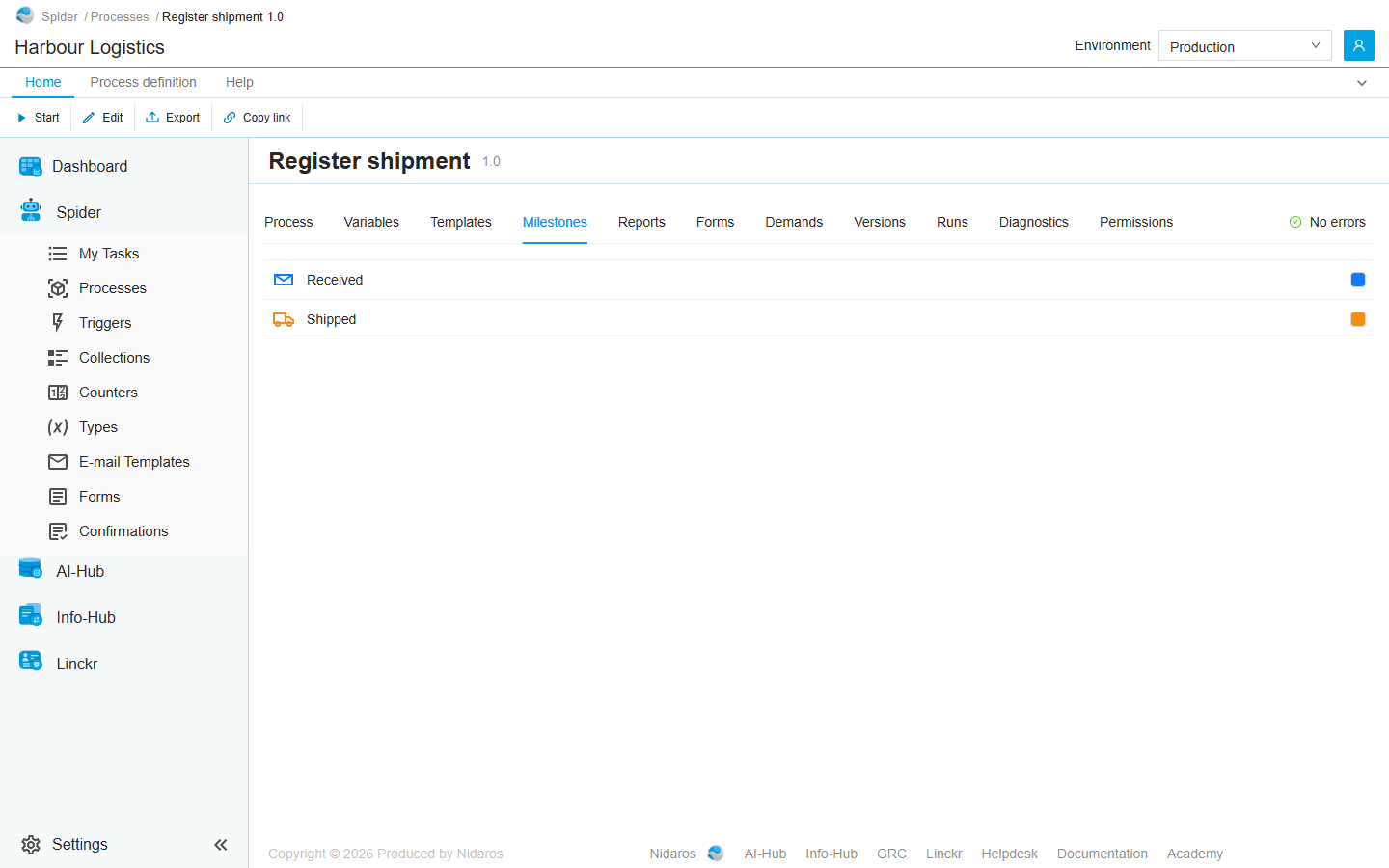
- Name: The name of this milestone, as a run shows it, unique in the process.
- Icon: The icon from the catalog this milestone is shown with. The catalog is the same for every organization, kept by an administrator: see Milestone icons.
- Colour: the icon's colour. It starts as the icon's own; Reset to default brings that back.
Marking a milestone
A run reaches a milestone when it runs the Set Milestone activity of the Spider module. Its one input, Milestone, lists the process's milestones, with their icons:

Place it where the milestone is reached: Register shipment runs Mark as received first, and Mark as shipped last. In a sub-process, the list holds the milestones of the process around it.
- The run's milestone is the latest it reached, whatever its place in the list. A milestone can be reached again later; reaching the run's current milestone once more changes nothing.
- A run that has ended can still reach one, when a node of it is retried, say.
- Milestones not reached don't show: a run shows only how far it got, not what is still to come.
Where they show
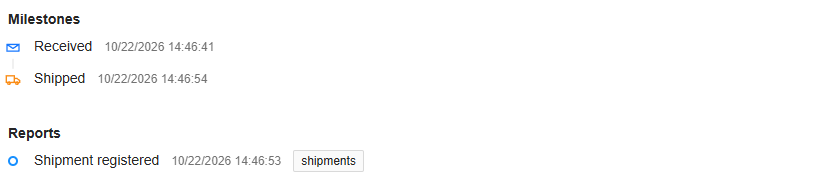
- On the run's page: the latest in its header, and all it reached, with their times, on the Details tab, under Milestones (No milestones reached until then). See Process run.
- In the lists of runs: the Milestone column, with the icon, name and time, which you can sort on. On the runs of one process, Filter by Milestone shows only the runs that are at the milestone you pick: whose latest milestone it is. See Processes.
Reports
A process's reports are on the Reports tab of the designer. Add report on the ribbon adds one:
- Name: The name of this report, as a run shows it, unique in the process.
- Tags: Labels the entries of this report are grouped by; a report may carry none. Press Enter to add one; the tags the process uses on its other reports are offered.
A run adds a report entry when it runs the Add Report activity of the Spider module, whose input Report lists the process's reports, with their tags. Every time the activity runs, it adds an entry: in a loop, one for each round, and again when the node is retried. An entry holds the report and its time, nothing more: put the details in the run's name or its variables.
A run's report entries show on its page, on the Details tab under Reports, oldest first, with their times and tags (No reports added until then).
When the names change
A run shows its milestones and reports as the version it ran names them. Renaming Shipped to Sent in a new version leaves the runs of the old version saying Shipped, and the runs of the new version say Sent. A milestone keeps its identity across versions, so Filter by Milestone finds the runs of both.
A run of a draft shows the draft's names as they are now.
Naming a run
A run is named after its reference, such as 20261022.0004, until the Set Process Run Name activity of the Spider module gives it a name of its own: Register shipment names its runs concat("Shipment ", {ShipmentNumber}, " (", {Shipment.Reference}, ")"), such as Shipment 3 (PO-2024-0414). The name shows in the lists of runs and on the run's page. Together with a milestone, it tells at a glance which run is which, and how far it got.
What the check says
| Message | What to do |
|---|---|
| The milestone has no name. | Give it a Name. |
| More than one milestone is named 'Received'; a milestone name is unique across the process. | Rename one. |
| The milestone 'Received' has no icon. | Pick an Icon. |
| The milestone 'Received' has the colour '…', which is not six hex digits behind a '#'. | Pick the colour again. |
| The report has no name. | Give it a Name. |
| More than one report is named 'Shipment registered'; a report name is unique across the process. | Rename one. |
| The report 'Shipment registered' has a tag that is blank or longer than 50 characters: … | Shorten the tag. |
| The input 'Milestone' is bound to a milestone that does not exist. | The milestone was deleted: pick another one. |
| The input 'Report' is bound to a report that does not exist. | The report was deleted: pick another one. |
Related chapters
- Process run: where a run shows its milestones and reports.
- Processes: the Milestone column and filter.
- Milestone icons: the icons to choose from.