
2.36.24
Gateways and conditions
A gateway chooses the way a run goes on: one branch, several branches, or all of them at once. Where the branches come together again, a gateway waits for them. This chapter explains how to give a gateway its conditions, how a run uses them, and how branches are joined. Where gateways sit among the other nodes is described in The designer and its palette.
Splitting and joining
A gateway either splits or joins, never both:
- A gateway with more than one link out splits the run into branches.
- A gateway with more than one link in joins branches into one again.
To join branches and split them again at the same point, use two gateways: one that joins, linked to one that splits.
How a gateway splits depends on its kind. You pick the kind in the Insert group of the Designer tab, and can change it later in the gateway's settings, under Type:
| Gateway | Takes |
|---|---|
| Exclusive gateway | One branch: the first whose condition holds. |
| Inclusive gateway | Every branch whose condition holds. |
| Parallel gateway | Every branch, without conditions. |
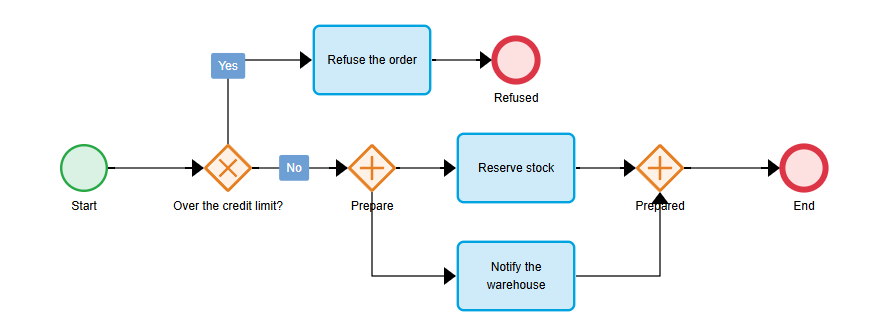
Check order above uses all of it. The exclusive gateway Over the credit limit? sends an order either to Refuse the order (Yes) or on (No). The parallel gateway Prepare then splits the work over Reserve stock and Notify the warehouse, which run at the same time, and the parallel gateway Prepared waits until both are done.
Conditions
An exclusive or inclusive gateway that splits needs a condition on each of its branches. Open the gateway's settings with the i on the node, or Properties on the ribbon:
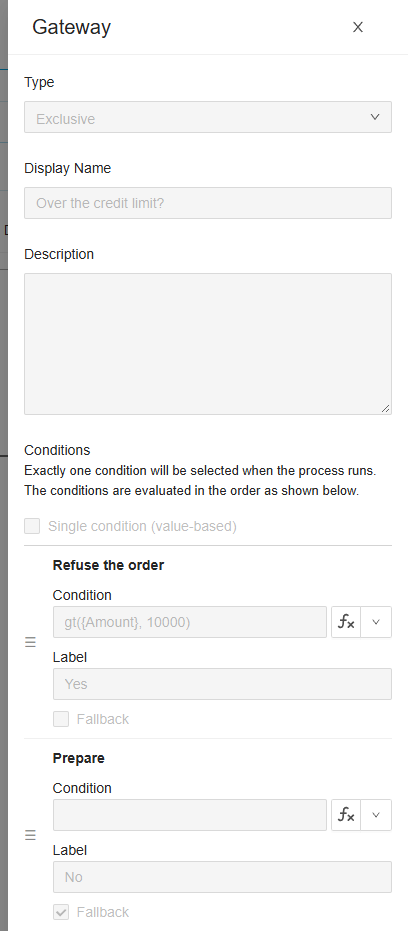
Under Conditions is a row for each link out of the gateway, named after the node it leads to. The row appears when you draw the link. Each row has:
- Condition: an expression that is
truewhen the run should take this branch, such asgt({Amount}, 10000). It must work out to a Boolean:{Amount}alone is refused, since a number is not true or false. - Label: what the canvas writes on the link, such as Yes. Without a label, the canvas writes the condition itself.
- Fallback: the branch to take when no other condition holds. See below.
A parallel gateway turned into an exclusive or inclusive one under Type gets no rows for the links it has already: delete those links and draw them again.
A condition can read the variables of its process, and of every process around it when the gateway is in a sub-process, and ProcessRun. The loop's {Item} isn't there: a gateway doesn't loop.
The order of the conditions
An exclusive gateway tries its conditions in the order the rows are shown, from the top, and takes the first that holds; the others aren't even worked out. Drag a row by its ☰ handle to move it up or down. So when two conditions can both hold, put the one that should win first:
| Order | Condition | Label |
|---|---|---|
| 1 | gt({Amount}, 10000) | Refuse |
| 2 | gt({Amount}, 1000) | Ask a manager |
| 3 | (none, Fallback) | Approve |
An order of 25,000 euros is refused, one of 2,000 goes to a manager, and one of 300 is approved. In the other order, every order over 1,000 would go to a manager.
An inclusive gateway works out every condition, so its order doesn't matter.
Fallback
Tick Fallback on the branch to take when no other condition holds; ticking it on one row unticks it on the others. A fallback usually has no condition of its own, as No in Check order. When it has one, it is tried like any other condition first, and is still taken when no condition holds.
Give every exclusive or inclusive gateway a fallback. Without one, a run in which no condition holds can't go on: the gateway fails with No next node found, and so does the run. The designer's check warns about it.
One value, several branches
When each branch stands for a value of the same thing, such as a country or a status, tick Single condition (value-based). The gateway then has one expression of its own, above the rows, and each branch a Value to compare its result with, instead of a condition:
| The gateway's expression | Branch | Value |
|---|---|---|
{Shipment.Country} | Ship within the Netherlands | NL |
| Ship to Belgium | BE | |
| Ship abroad | (none, Fallback) |
A branch's value can be a literal, as here, or an expression; its button switches between the two, as an input's does. A run works the gateway's expression out once, and takes the branch whose value is equal to it: with an exclusive gateway the first, with an inclusive gateway every one.
Parallel gateways
A parallel gateway has no conditions: a run takes every link out of it. Use it for work that can be done at the same time, such as Reserve stock and Notify the warehouse. The branches run side by side: each goes on as far as it can, without waiting for the others, until a gateway joins them.
Joining
Every kind of gateway joins the same way: it waits until every branch that was taken has arrived, and then goes on once. A branch that an earlier gateway didn't take isn't waited for. So an inclusive gateway that took two of its three branches can be joined by a gateway that waits for just those two.
Use a parallel gateway to join, unless you have a reason not to: it shows best what happens.
A run fails at a node that fails, but the other branches go on as far as they can: the run is Running with errors meanwhile. A joining gateway waits for the failed branch too, so the run gets no further than the join until the failed node is retried or cancelled. See Process run.
Pass Through
Tick Pass Through in a joining gateway's settings to let each branch go on as soon as it arrives, without waiting for the others. Everything after the gateway then runs once for each branch that arrives: two branches, two times. Use it only when that is what you want, such as a notification for each branch that finishes.
The settings of a joining gateway, and of a parallel gateway, have only Pass Through besides the name and description: a gateway that joins has no conditions.
In the run
On the run's Process tab, the links the run followed are green: you can see which branch a gateway took. The gateway's log on the Logs tab says what it did, line by line: each condition it tried (Evaluating expression for path to node Refuse the order: gt({Amount}, 10000)), its result, and the node or nodes it picked (Selected next node(s):). Turn Hide verbose off to see every line. See Process run.
When a gateway fails, its log says why:
| Log | Why | What to do |
|---|---|---|
| No fallback condition found, then the gateway fails with No next node found | No condition held, and there is no fallback. | Give the gateway a fallback, or fix the conditions, then retry the run. |
| Condition value not a Boolean type | A condition worked out to something other than true or false. | Fix the condition. |
| Expression for path to node … failed | A condition couldn't be worked out, such as a function given a value it can't take. | Fix the condition, or the value it reads. |
| Conditions are missing | The gateway splits, but has no conditions. | Give it its conditions. |
A run uses the version it started with, so a fixed condition reaches the runs started after you publish it. To get a failed run past the gateway, change the variable its condition reads on the run's Variables tab, and retry it.
What the check says
| Message | Severity | What to do |
|---|---|---|
| The gateway has multiple outgoing links but no conditions. | Error | Give each branch its condition, or make it a parallel gateway. |
| The gateway condition for node 'Refuse the order' has an invalid expression: … | Error | Correct the condition: the rest of the message says what is wrong. A condition must work out to a Boolean. |
| The gateway condition for node 'Refuse the order' has no expression, so its path is never selected. | Warning | Give it a condition, or make it the Fallback. |
| The gateway condition for node 'Refuse the order' is a literal, but a condition on this gateway has to be a Boolean expression. | Error | Make the condition an expression, or tick Single condition (value-based). |
| A gateway condition targets node 'Refuse the order', which is not connected to the gateway. | Error | Draw the link again, or delete the gateway and place it anew. |
| The gateway compares a single expression, but the expression is missing. | Error | Fill in the gateway's expression, or untick Single condition (value-based). |
| The gateway expression is invalid: … | Error | Correct the gateway's expression. |
| The gateway has no fallback condition; a run fails when no condition matches. | Warning | Make one branch the Fallback. |
Related chapters
- The designer and its palette: placing gateways, and how they may be linked.
- Expressions: what a condition can work out.
- Sub-processes and loops: repeating steps, which a loop on a node does without gateways.